%402x.png)
Recognition only changes culture when employees can see it, give it, and stick with it. This release makes all three easier.
We've extended Motivosity to the shared screens in your breakrooms and shared spaces, rebuilt our Microsoft Teams integration from the ground up, gave milestones a serious upgrade, and made budgeting for your program a whole lot cleaner.
Since our last What's New, we've delivered new capabilities that help you:
Every update ladders back to one goal:
Helping you build a more connected, engaging, and human workplace—from first day to last—without adding more work to your plate.
Let's dive in!
Module: Motivosity Platform
Most recognition programs live inside a desktop or mobile app, which means they're only visible to people who happen to open it. Appreciations get sent, milestones get posted, programs get launched, and some of your team never sees any of it unless they're actively looking.
Motivosity TV puts that activity where people already are. Shared screens in breakrooms, lobbies, common areas, and hallways become a live feed of what's happening across your organization: recognitions, milestones, announcements, awards, achievements, customer recognition, and more—rotating in real time.
Culture stays top-of-mind without anyone having to go looking for it.
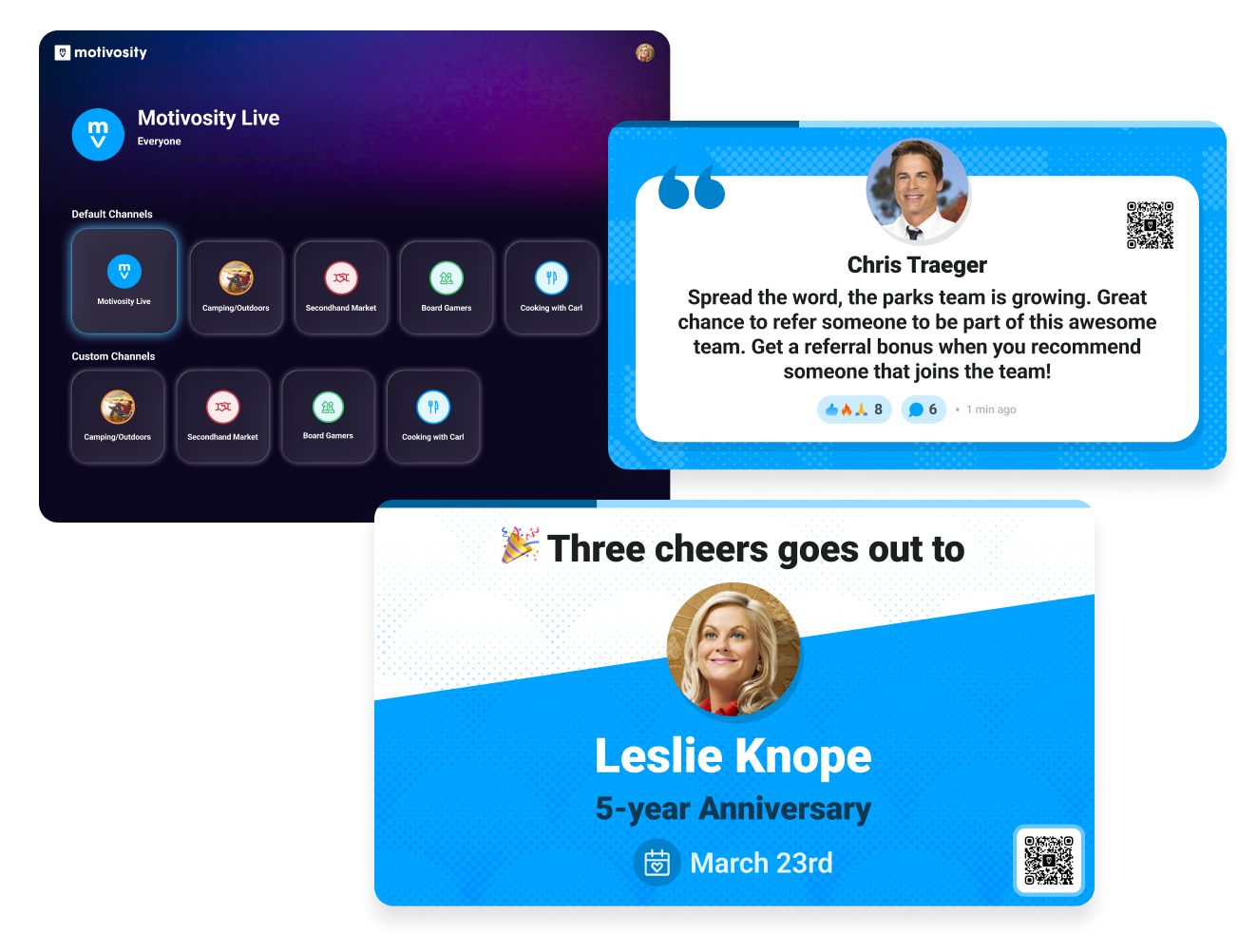
A recognition program nobody sees is a program that loses momentum. Motivosity TV surfaces your culture continuously, so the work people are doing to recognize each other actually lands, and the programs you've built stay present instead of fading into the background.
No complicated install, no per-device accounts. Admins register a screen in Setup, pair it with a code, and the device is live. Apple TV, Google TV, and browser-based displays are all supported, so whatever's already on the wall can become a physical extension of your culture.
Show the company-wide home feed , dedicate a screen to a Space, or build custom channels for a specific team, location, or moment. And if connectivity hiccups, Motivosity TV keeps showing cached content so the wall stays alive while you sort out the wifi.
Module: Motivosity Platform
If your company runs on Microsoft Teams, recognition shouldn't live in a separate tab people forget to open. The older Microsoft-provided connector struggled badly with SSO—which meant entire employee populations couldn't reliably give or receive Appreciation inside the tool they used every day.
We've rebuilt the Motivosity Teams integration from the ground up. The new integration brings two things to Teams: a Motivosity bot that lives in personal chat, and a tab where the full Motivosity experience runs inside Teams itself. SSO works the way IT and HRIS expect it to, and the install runs through standard Microsoft Admin consent, so your security team doesn't have to fight the rollout plan.
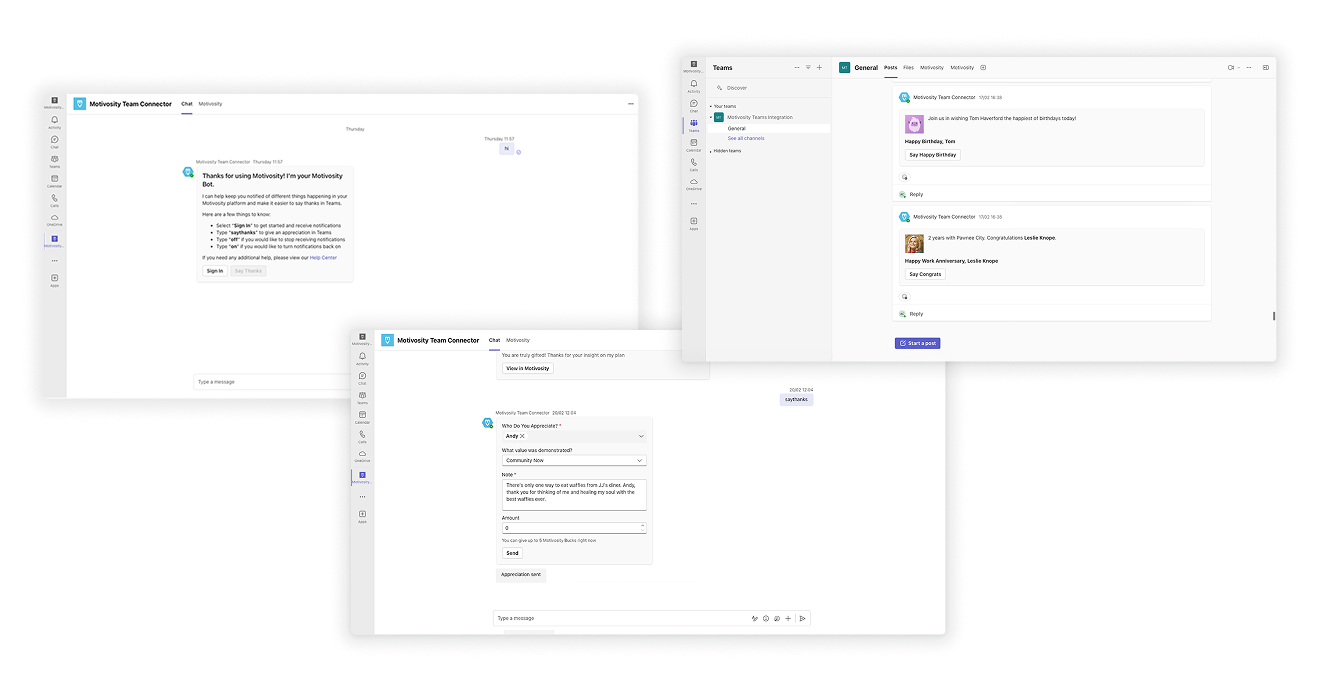
Recognition should be as easy as sending a message. With the new bot, employees can show gratitude directly from Teams. Search for a teammate, pick a company value, add a note and some Motivosity Bucks, and send. No tab-switching, no copying links, no breaking flow.
After your Microsoft admin grants consent, company admins can route home feed posts into a Teams channel of their choice, and Space owners can do the same for their Space. Celebrations show up where your team is already talking and the right context exists.
Each employee gets their own bot conversation that delivers their personal moments—recognition received, spot bonuses, milestones, and more—right to their Teams activity feed. And if it's ever too much, every employee can toggle their personal notifications on or off from inside the bot.
Module: Employee Milestones
Milestones are some of the most underrated moments in an employee's journey. A birthday or work anniversary should feel like a bigger deal than a routine post in the feed—and now it does.
We've enhanced the milestone experience across desktop, mobile, and email to make celebrations more visible, more interactive, and harder to scroll past.
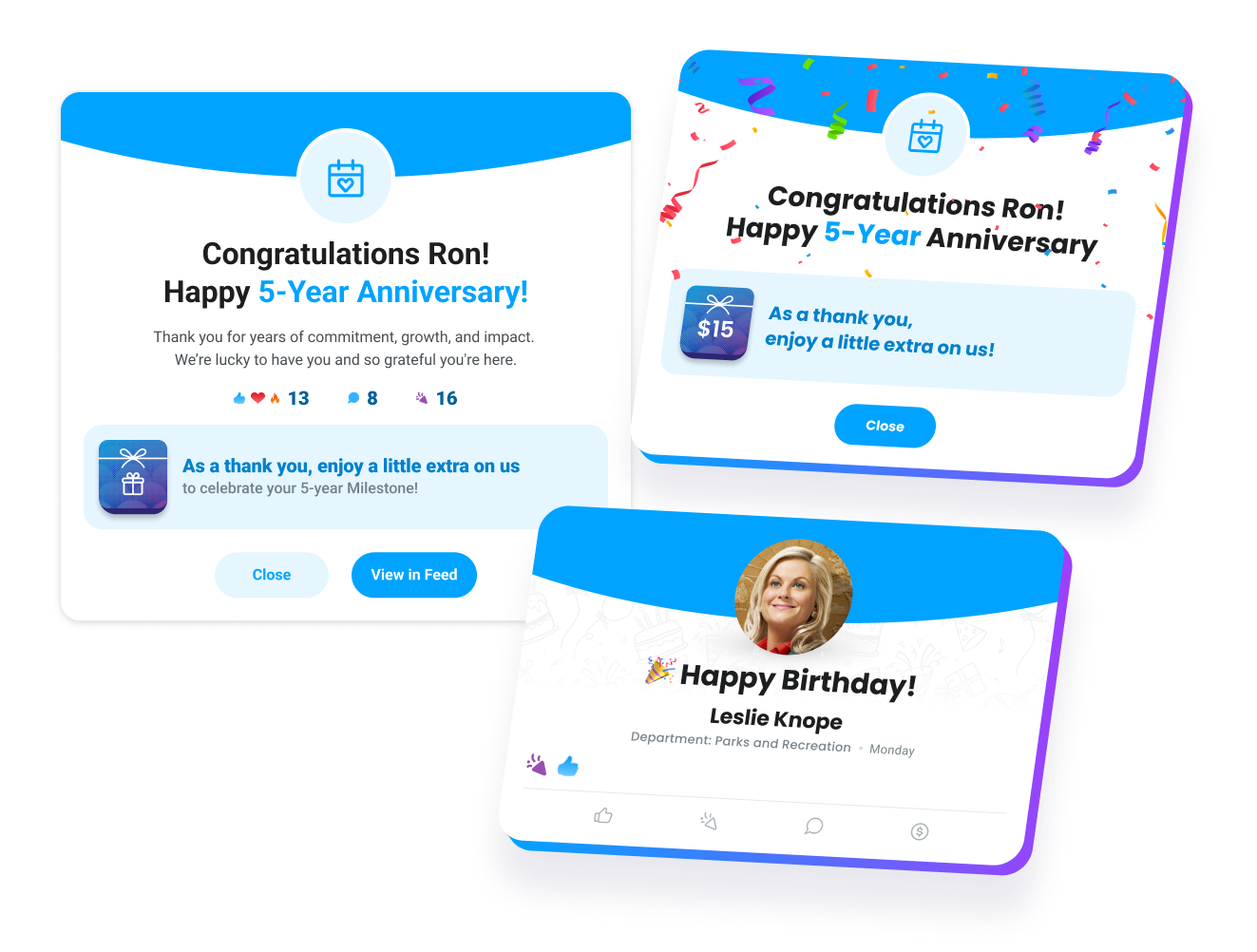
The updated design introduces a more prominent, visually engaging layout that captures attention across every surface. Whether employees are browsing on desktop, on mobile, or checking their inbox, milestones now stand out the way they're supposed to.
Automation ensures consistency, but unified celebration amplifies culture. The new "Celebrate" reaction adds a layer of delight (confetti included 🎉) that encourages employees to engage in the moment. Clear calls to comment, react, or add a reward make it easier for managers and peers to actively participate rather than passively scroll by.
With expanded customization options, you have more control over the content and imagery for your automated milestones, so celebrations sound and feel like your company, not a generic template.
Module: Motivosity Platform
Every unresolved employee balance creates a financial loose end. When an employee leaves without their Motivosity balance being properly closed out, those funds remain unresolved inside your recognition program. Across a year of turnover, that becomes a compliance risk, a liability, a reconciliation burden, and a financial exposure many HR and Finance teams do not realize they are carrying.
If your organization cannot clearly answer what happened to a departing employee’s remaining balance, you have a gap. Was it redeemed, forfeited, distributed according to policy, or left sitting in limbo? Was the same process applied consistently across every departure? Is there an audit trail?
Employee Off-boarding in Motivosity helps HR and Finance close that gap automatically. When an employee is deactivated, Motivosity resolves their remaining balance, sends a personalized farewell message, and gives them a way to redeem what they have earned without requiring manual intervention, payroll action, or continued system access. No funds left in limbo & no manual follow-up. A clean, consistent, auditable closeout process for every departure.
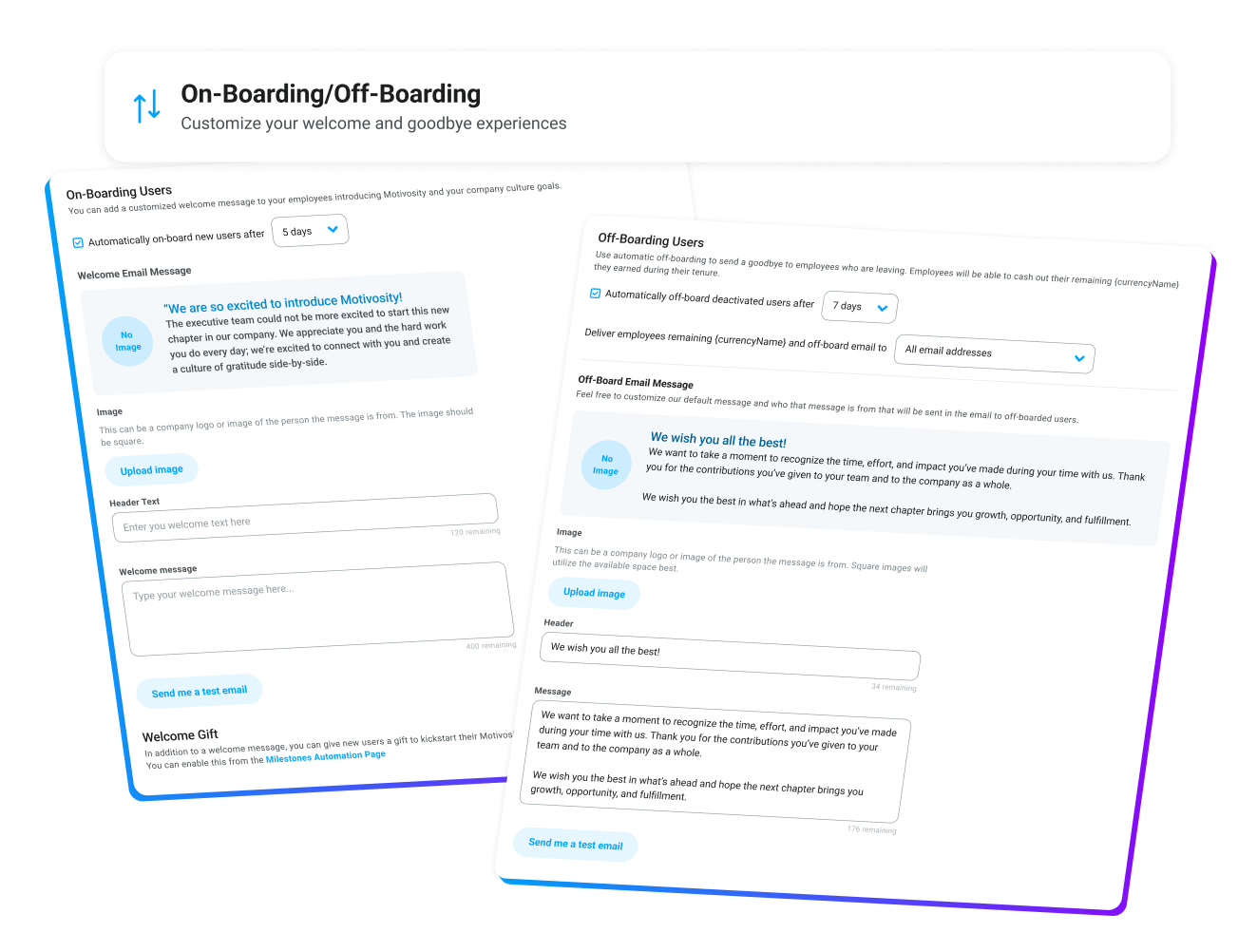
Unresolved balances are not just an administrative nuisance. They represent funds your organization must account for. Off-boarding automation ensures every departure is handled consistently, with remaining funds resolved according to your settings and closed out cleanly.
Admins control how the process works: whether automation is enabled, which employees are included, and what message is sent. The workflow runs according to your rules, helping your organization align off-boarding with internal policy while maintaining a clear audit trail.
Departing employees do not need continued account access to use their remaining balance. They can redeem on their own timeline without requiring HR to keep accounts open, restore access, or manage post-termination follow-up. We've got you covered!
Smart Funding is currently available in open beta. Talk to your Motivosity CSM to see if it is right for you and get access.
Module: Motivosity Platform
You're probably used to funding your programs upfront: load a balance, watch it sit, reconcile it later. Smart Funding flips that. Instead of pre-loading a lump sum and hoping your estimate was right, your payment method is charged monthly based on what your program actually used. No over-funding or guessing, and no manual top-ups when you run short or your employees complain about declined ThanksMatters Card transactions.
Here's how it works: reward currency is withdrawn from your budget the moment an employee receives an appreciation, gift, or other form of recognition with dollars or points attached—when it becomes spendable. Motivosity charges your connected payment method for exactly what was used. You put in a small initial deposit to cover the first month and any early variance, and from there the program funds itself.
Module: Motivosity Platform
The first streak action available will be login counts. Additional options for streak actions coming soon.
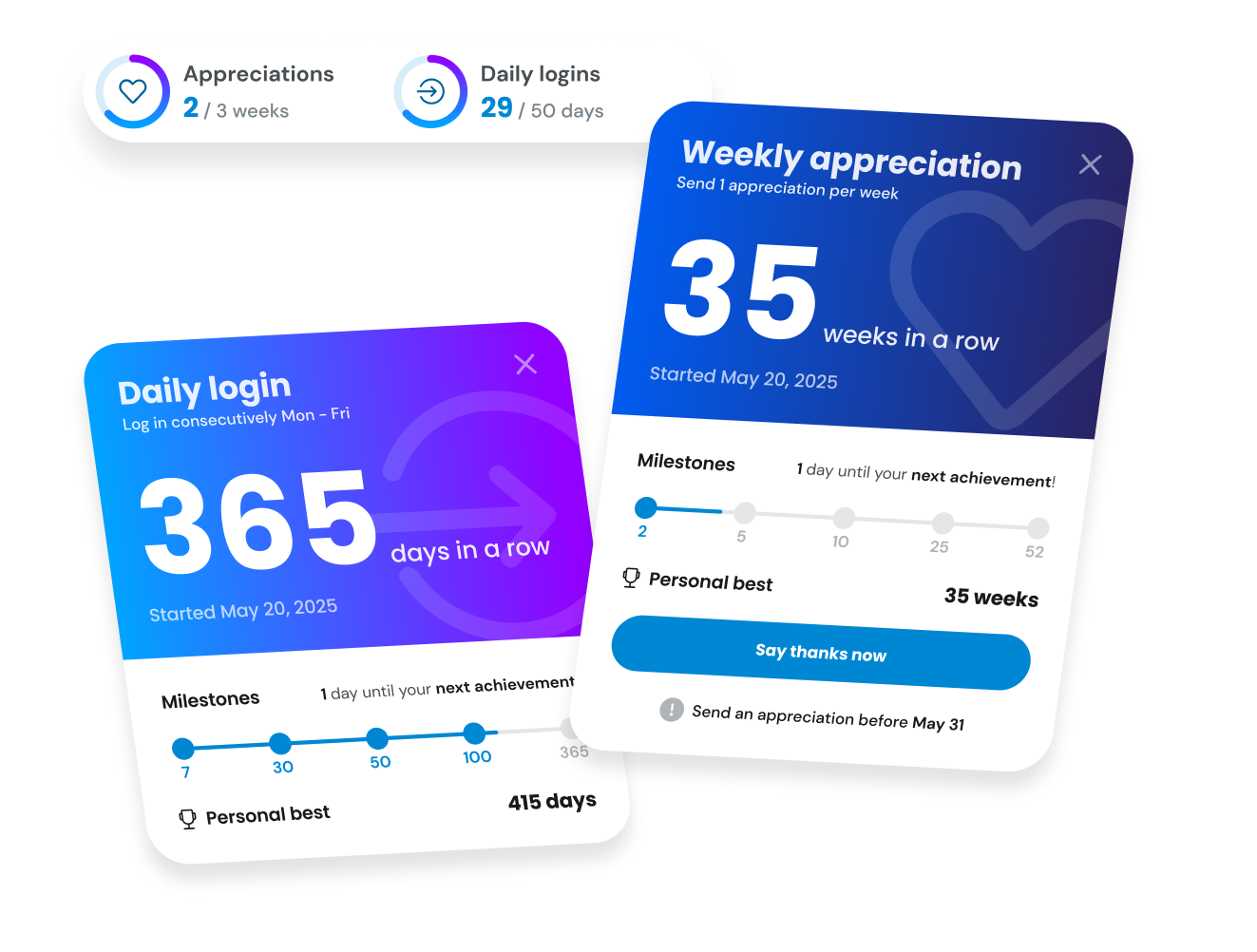
Streaks reward employees for showing up consistently. Badges are awarded automatically at meaningful thresholds, and streaks show up on the home page widget and on profiles so progress is visible.
It's a small nudge that makes a real difference for participation—especially for frontline teams who don't always have a natural reason to open Motivosity regularly.
Streaks are coming very soon. Keep an eye out!
Small improvements add up. Here's a quick look at the polishes we've shipped recently.
With every release, our goal stays the same: help your people feel more connected, more appreciated, and more supported—while making your job easier.
If you'd like to activate any of these new features or explore what's possible, your Motivosity team is here to help.
Thanks for reading!